Findings / UX-060
One unlabelled X throws away the whole recording, with no confirmation
OpenHighFailureClaude app (iPhone and iPad)
What we saw
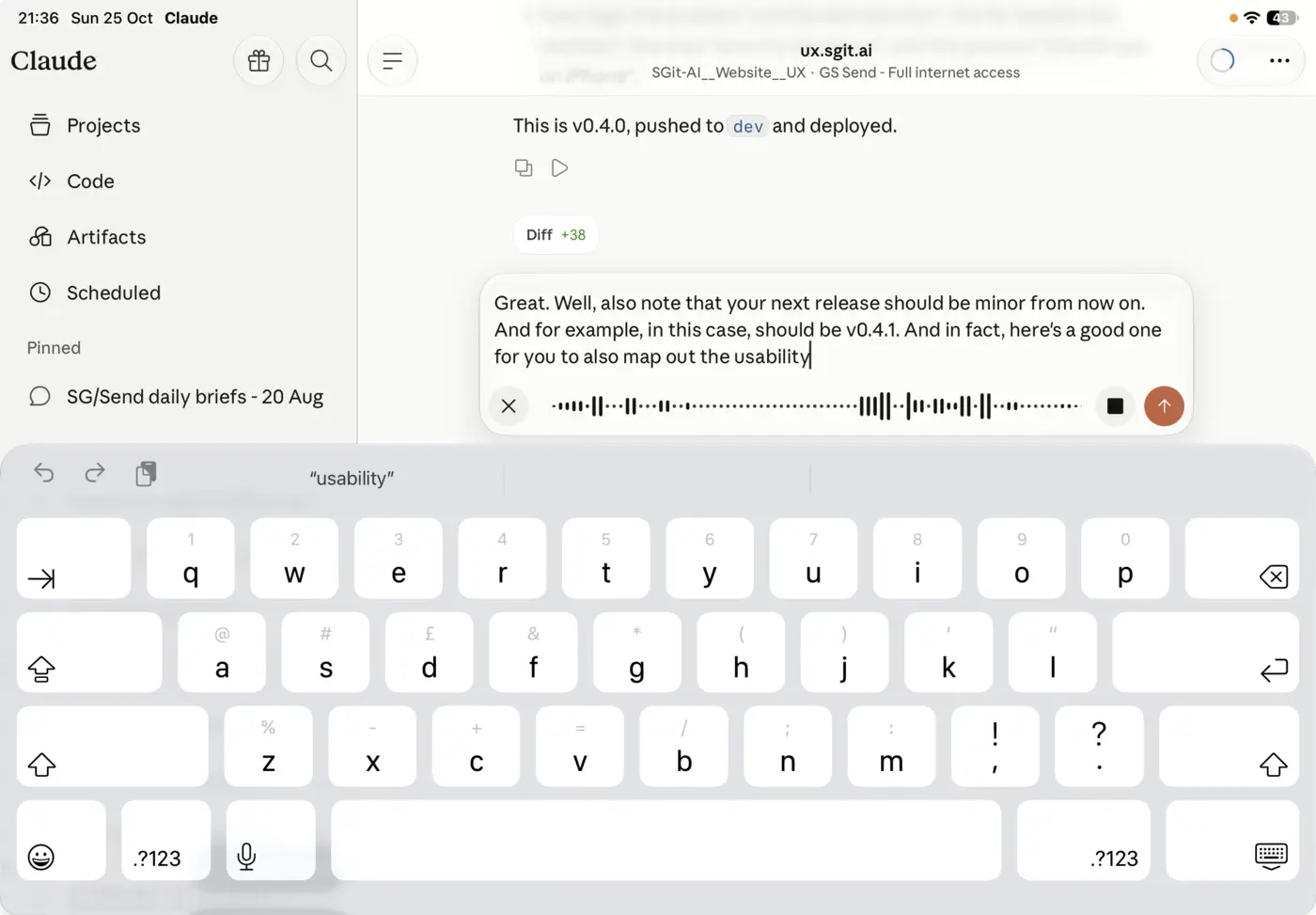
While dictating, the message box shows three buttons: an X on the left, a square and an up arrow on the right. None is labelled. The X discards the recording and its transcript at once: no "discard this recording?", no undo, no copy kept. It sits where a "close" or "minimise" usually sits.
Why it matters
A minute of dictation, often the hardest part of the message, is gone in one tap, on the button that looks least consequential. It has already happened to the reporter: "I literally fell for this in the past."
The fix
Ask before discarding a recording longer than a few seconds, or discard with an undo ("Recording discarded · Undo") and keep the audio for a while. Label it "Discard". Move it away from the corner people tap to dismiss things.
The record
| Status | Open |
| Severity | High |
| Kind | Failure: works against the reader |
| Product | Claude app (iPhone and iPad), app |
| Where | Message box, voice input |
| Problems | Data loss, Unlabelled |
| Visibility | Obvious: every reader sees it, every time they reach that point |
| Recommendation | Confirm or undo: a destructive action either asks first or can be undone, and the safe choice is the easy one |
| Area | Input and dictation |
| Breaks | Work is never lost to one tap or a silent failure |
| Observed | 2026-10-25, not recorded |
| Last checked | 2026-10-25, not recorded |
| Environment | Claude app on iPad, landscape, dictating a message into a Claude Code session |
| Source | Reported by Dinis Cruz, 25 Oct 2026, by voice, with a screenshot |
Previous: UX-059 A security prompt that asks you to approve a command it does not explain, and cuts off
Next: UX-061 Three voice controls with no labels: the safe one and the send-as-is one sit side by side