Findings / UX-056
Scrolling back up a little puts focus in the address bar and opens the keyboard
OpenHighFailureFirefox on iPad
What we saw
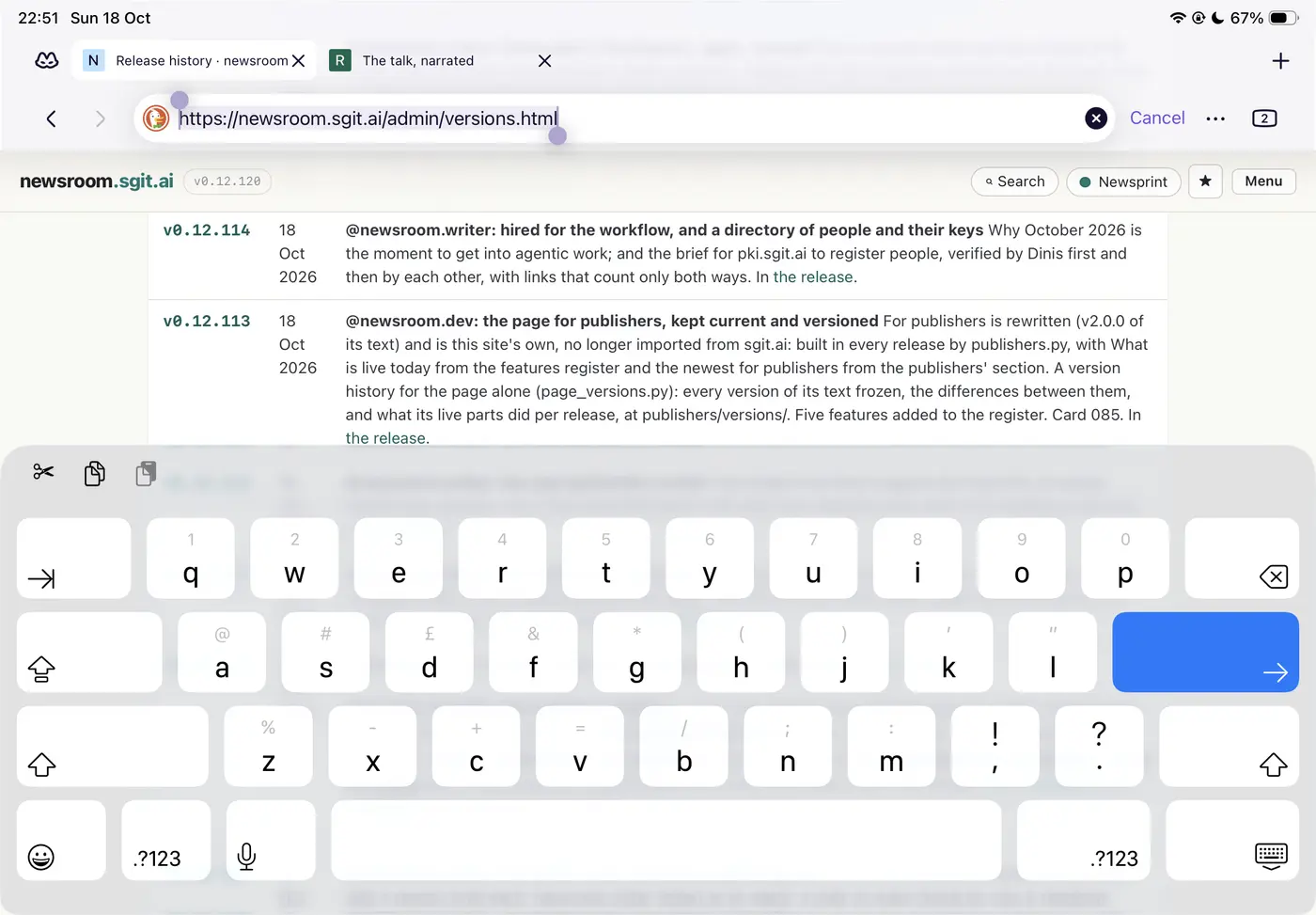
Reading a long page, a small scroll back up brings the hidden toolbars back, the address field gets focus with its URL selected, and the on-screen keyboard opens over the bottom half of the page (second screenshot: the URL selected, Cancel showing, the keyboard covering the release table). Nothing on the page was tapped on purpose. A likely mechanism, not yet confirmed: the toolbar slides in under the finger mid-gesture, so the touch that was a scroll lands on the address field as a tap.
Why it matters
The reader was not asking to go anywhere, and loses half the screen to a keyboard. Worse, it looks like the page has a bug: the first reading was that the site had somehow started an edit. The browser's fault is charged to the site, and the reader's concentration is broken either way.
The fix
For the browser: a scroll gesture never focuses the address field; only a deliberate tap on a toolbar that is already at rest does. For the sites: nothing a page can prevent, but worth knowing that readers will report it as our bug, so it is recorded here with its real owner.
The record
| Status | Open |
| Severity | High |
| Kind | Failure: works against the reader |
| Product | Firefox on iPad, browser |
| Where | https://newsroom.sgit.ai/admin/versions.html |
| Problems | Focus hijack, Unexpected movement, Wrong culprit |
| Visibility | Intermittent: some readers, some of the time: depends on a gesture, a device or a state, and is hard to reproduce on demand |
| Recommendation | Keep the UI still: nothing moves, appears or takes focus unless the reader asked for it; chrome that hides stays hidden until a deliberate gesture |
| Area | Navigation |
| Breaks | Nothing moves that the reader did not move |
| Observed | 2026-10-18, not recorded |
| Last checked | 2026-10-18, not recorded |
| Environment | Firefox for iOS on an iPad, landscape, reading newsroom.sgit.ai/admin/versions.html (newsroom v0.12.120) |
| Source | Reported by Dinis Cruz, 18 Oct 2026, with screenshots |
Previous: UX-055 "Ask the article" has never run against a real on-device model
Next: UX-057 The toolbars come back on any small scroll up, taking screen and moving the page